
Dear user, a new release is available in Boarding.
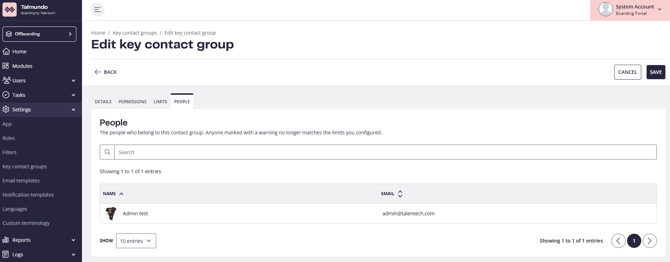
See who is assigned to a Key Contact Group
Open a contact group and see who is currently assigned as its key contact, right on the group, without checking each boardee one by one.
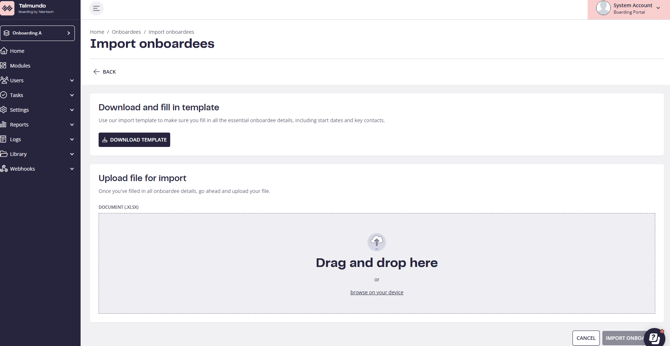
A clearer Excel import for users and boardees
When an import does not go through, you now see which rows were imported and which were not, with an error message for each row, instead of a single failure message. Download the template, fill it in, upload the .xlsx file, and fix only the rows that need it. The import pages also have a more modern look that puts usability first.

Jump straight to the person
On the dashboard you can create a boardee from the Upcoming boardees card and open a boardee’s profile from a row or an alert. Key contact names, and the names in the Quick View of Assigned Tasks and My Tasks, now open the profile too. You see the links wherever you have permission to view the person. We will keep adding quick navigation like this in upcoming releases. If you have suggestions for high-impact shortcuts, let us know!
From Onboardee's profile:
From Assigned tasks :
Bug fixes🐞
Coming next: from Varbi hire to Talmundo onboardee
We are building a connection between Varbi and Talmundo, so a new hire does not have to be typed in twice. The flow we are working towards:
Details may still change as we build it.
Questions or feedback? Reach out to boarding@support.talentech.com
See who is assigned to a Key Contact Group
Open a contact group and see who is currently assigned as its key contact, right on the group, without checking each boardee one by one.
A clearer Excel import for users and boardees
When an import does not go through, you now see which rows were imported and which were not, with an error message for each row, instead of a single failure message. Download the template, fill it in, upload the .xlsx file, and fix only the rows that need it. The import pages also have a more modern look that puts usability first.
Jump straight to the person
On the dashboard you can create a boardee from the Upcoming boardees card and open a boardee’s profile from a row or an alert. Key contact names, and the names in the Quick View of Assigned Tasks and My Tasks, now open the profile too. You see the links wherever you have permission to view the person. We will keep adding quick navigation like this in upcoming releases. If you have suggestions for high-impact shortcuts, let us know!
From Onboardee's profile:
From Assigned tasks :
Bug fixes🐞
- Boardee and user lists load again for admins in Denmark and Norway
- The visibility date offset on a task now stays empty when it is empty, and Undo in the assignee type dialog puts the selection back where it was.
- User search now finds names by any part of the name, not only the start.
Coming next: from Varbi hire to Talmundo onboardee
We are building a connection between Varbi and Talmundo, so a new hire does not have to be typed in twice. The flow we are working towards:
- When a candidate is hired in Varbi, the hiring manager reviews the candidate’s details and enters who will be responsible for the new hire.
- The hire is sent on to Talmundo and waits there as a draft, under incoming hires.
- The onboarding manager finalises the details, such as filters and key contacts, and creates the onboardee, who is then ready for their journey.
Details may still change as we build it.
Questions or feedback? Reach out to boarding@support.talentech.com