
A rebuilt Task Experience
For anyone who works with tasks, this is the headline of the release. The Assigned Tasks page used to take thirty seconds to a minute to load, and sometimes timed out completely. It now loads in a few milliseconds. That is the difference between a page people dread opening and one they can actually work in, and it is the single biggest customer-facing win this release.
The Assigned Tasks and Create/Edit Task pages, together with My Tasks and the Tasks Library, have been rebuilt on our modern front-end. On top of the speed, admins get a cleaner layout with more distinct areas, and creating tasks now follows the same pattern as our newest module pages, which makes translations easier to manage.
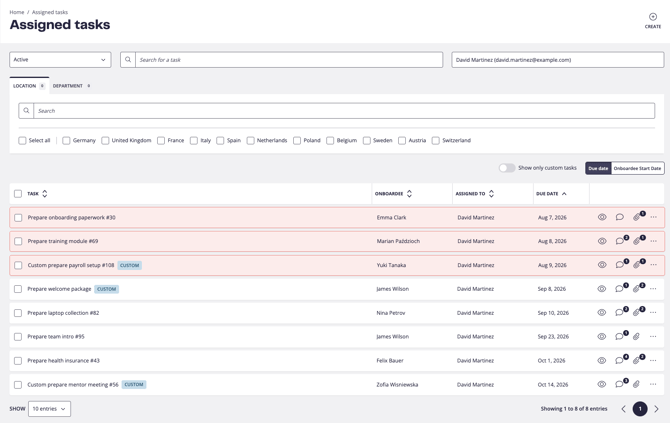
Please note: this new view will be rolled out gradually to customers.
A rebuilt Onboardees list and Boardee Profile
The Onboardees area is where HR and admins keep track of everyone coming in and going out, so speed and clarity here save real time every day. Both halves have been rebuilt on the modern front-end.
The Onboardees list now loads noticeably faster, has the new in-table bulk actions built right in (more on those below), and gains a new filter to show the boardees linked to a specific person through the key contact relation, so a manager or HR admin can pull up everyone a given contact is responsible for in one step.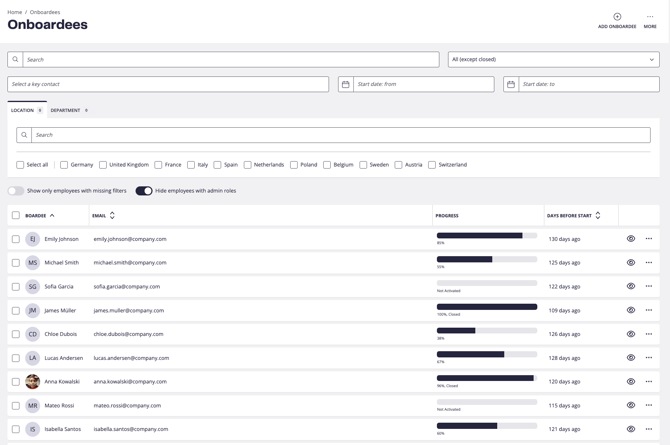
The Boardee Profile now surfaces submission progress more clearly, so admins can see at a glance what a boardee has completed and how far along they are. Actions that used to be scattered, including reset password and reset 2FA, are now available directly from the profile header, so opening a profile no longer means hunting for them.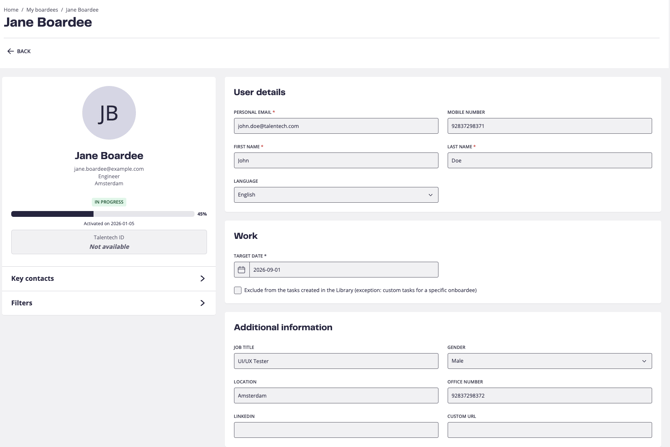
Please note: this new view will be rolled out gradually to customers.
Bulk actions built into the tables
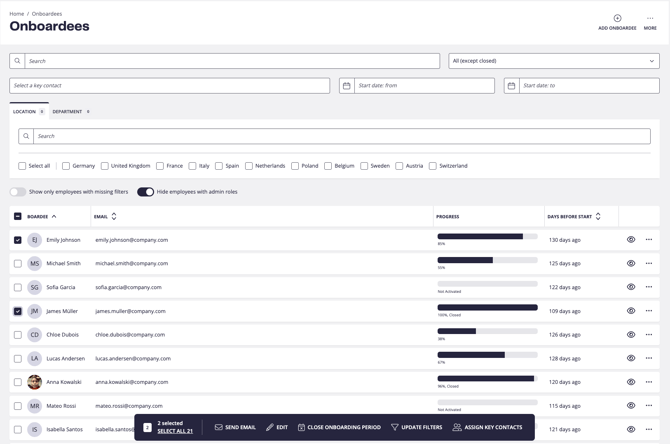
Acting on many boardees or users at once used to mean leaving the list for a separate wizard. Now it happens right where you are. You can select boardees or users directly in the Onboardees and Users tables and act on them in place: send emails, edit details, update filters, assign roles or key contacts, and close or delete records. Selection respects your current filters, and permissions are honoured so admins only see the actions they are allowed to run.
An example of choosing many tasks to delegate to another employee.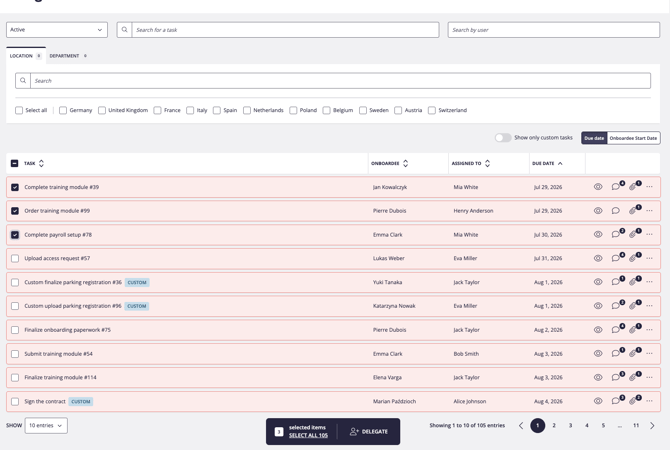
An example of the onboardee bulk actions.
A refreshed Email Templates page
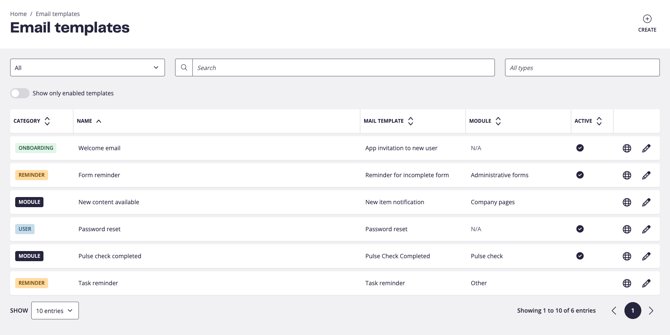
The Email Templates page is part of the admin toolkit, and it now matches the look and feel of the rest of the modernised admin experience: cleaner, more consistent, and easier to work in. How templates themselves work is unchanged; this is the groundwork that lets us keep improving the page from here.
This does not change how the templates are actually edited.
Email Logs: smarter search
Searching for someone by email is one of the most common things admins do, and it was quietly failing for some addresses. Searching by email now works reliably, including addresses with special characters such as a plus sign (for example john.doe+admin@talentech.com), which previously could return nothing at all. The fix applies across Assigned Tasks, Users and Onboardees, and any other search field using the same component.
Easier boardee creation when the email already exists
Creating a boardee for someone already in the system used to be a common source of inconsistent or duplicate records. Autofill has always been able to pull in an existing user's details, but only if you typed part of the email and picked a match from the dropdown. If you pasted a full email address and moved on without selecting, autofill would not trigger. Now, pasting an email that already belongs to a user brings up a prompt offering to load that person's details in one click, so it works even when you do not use the dropdown. Less re-typing, and fewer accidental duplicates.
Faster learning pages for large content structures
Customers with large content structures were seeing learning pages load slowly. We optimised how access permissions are resolved when loading learning pages, removing a set of repeated database calls, so those pages now load faster with no change to how anything looks or works.
Bug fixes and smaller improvements
We are committed to keeping the boarding product in top-notch condition. This release resolves an issue that was affecting customers in production, and adds a couple of quality-of-life improvements to the admin tables.
- Admin users no longer appear in Upcoming boardees on the Home page. Some admins were showing up in the Upcoming boardees list on the Home page where they did not belong, which was confusing for customers. This regression is now fixed.
- Mobile-friendly admin tables with sticky columns. The admin tables now handle narrow screens gracefully: overflowing columns can be scrolled horizontally with touch or arrow controls, while the first column and the actions column stay pinned in place, so the tables stay usable on smaller screens.