
We’ve changed how you make settings for timing and publication, added the possibility to preview the video you’re linking to, and how you overview translations and work with translating content.
%20(1).png?width=670&height=384&name=image%20(25)%20(1).png)
Is now possible to add translations to the module without leaving the page.
Here you’ll get an overview of activated languages. When clicking edit, you’ll also see the status of each language.
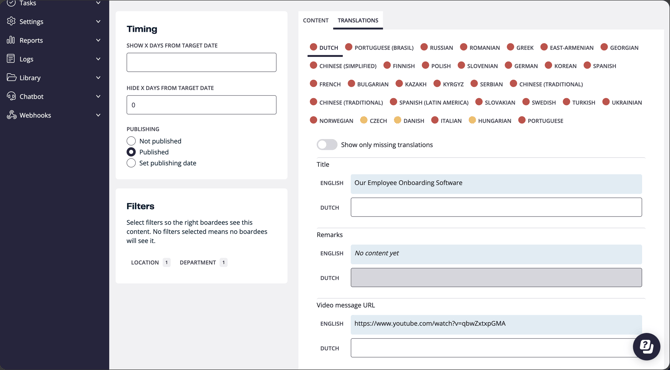
Gray : not any translated content for this language
Yellow :partly translated content for this language
Green : fully translated language.
There’s also a toggle setting Show only missing translations that will filter out only missing translations so you easily can spot which ones need to be added.
- The “Is active” checkbox and “Calendar date to launch” setting are removed and are replaced with the publishing settings:
- Not published , this content is not available for boardees.
- Published : visible for boardees according to the timing criteria.
- Set publishing date : when picking a date here, it means that this content will start appearing for boardees at that specific date.
- A preview will show when adding a link so you can verify it’s the right content.
Is now possible to add translations to the module without leaving the page.
Here you’ll get an overview of activated languages. When clicking edit, you’ll also see the status of each language.
Gray : not any translated content for this language
Yellow :partly translated content for this language
Green : fully translated language.
There’s also a toggle setting Show only missing translations that will filter out only missing translations so you easily can spot which ones need to be added.