
Seniority Date in Employee Profiles
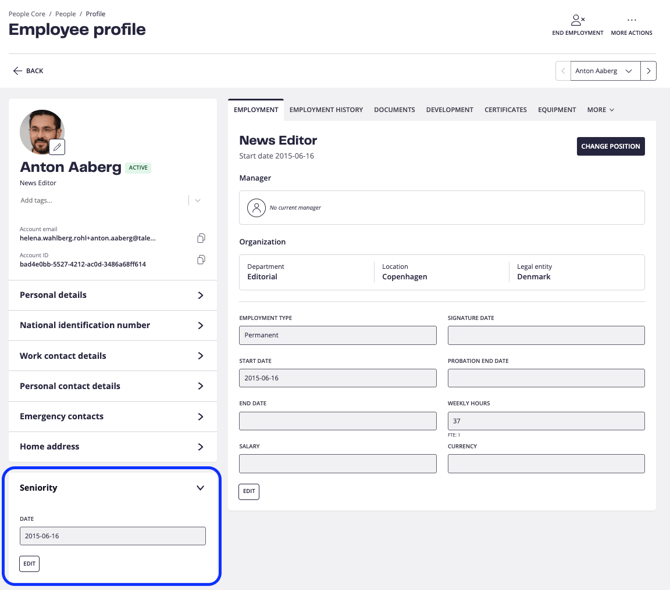
The Seniority date is displayed on each employee’s profile. By default, it shows the earliest known employment start date for the employee. If needed, you can manually edit the date to reflect another starting point.
This date is used to calculate work anniversaries, which can trigger notifications to relevant stakeholders, such as managers.
Seniority in Analytics
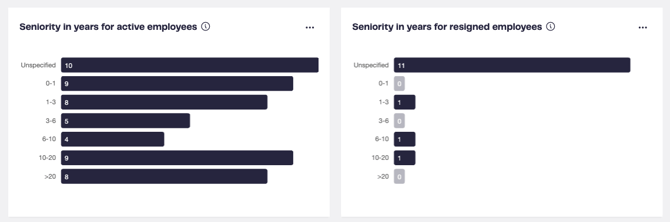
In Analytics, you can view seniority across your organization for:
-
Active employees, and
-
Former employees who have resigned.
Clicking a bar opens a detailed list of the employees included in that metric.
You can also apply filters to view seniority data for any specific part of your organization.
Controlling Access to Seniority Information
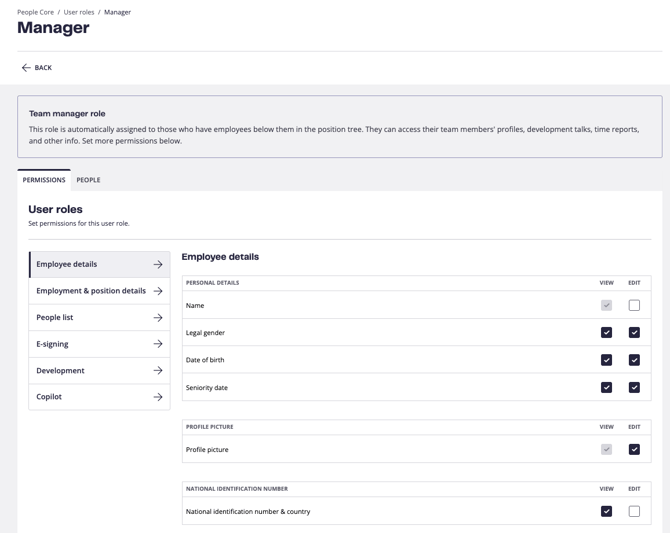
Access to view or edit the Seniority date can be controlled via User roles.
Go to:
Settings → User roles, select the relevant role, and adjust the permissions for viewing and editing the Seniority date.
Setting Up Seniority Dates
People Core automatically populates the Seniority date using the start date of the employee’s first position.
If a different date is needed, you can update it either:
-
Directly in the employee’s profile, or
-
By exporting employee data, updating the dates, and importing the file back into the system.
FAQ
How is seniority calculated when employees are rehired?
Currently, the Seniority date from the employee’s first employment is kept when the employee is rehired. All seniority calculations are therefore based on the original employment date.